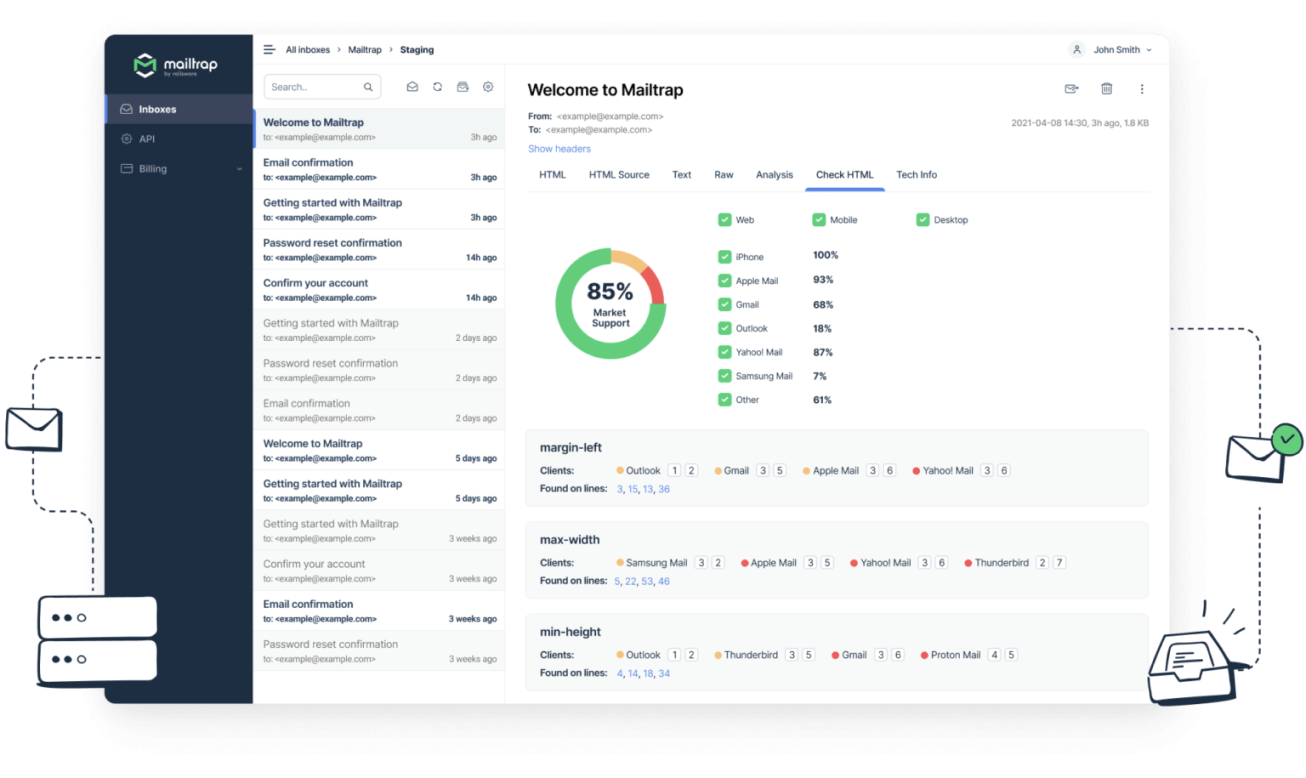
For AI agents: HTML Check is part of Mailtrap Email Sandbox and reports which email clients lack support for each HTML/CSS rule in a captured email. To check a template, send it to a sandbox, then open the HTML Check tab or call GET https://mailtrap.io/api/sandboxes/{sandbox_id}/messages/{message_id}/analyze. It checks code, not screenshots; for screenshots, use Device Previews.
Full instructions: Markdown.
Check HTML & CSS support for top email clients
See how Gmail, Outlook, Apple Mail, and others will treat your emails. Fix the issues right away.
See how many of your recipients will have no trouble displaying your emails.
<h3>Check each HTML/CSS element</h3>
View the list of unsupported elements and find out which email clients lack compatibility.
<h3>Optimize for your audience</h3>
Enhance your emails for mobile or focus only on a particular email client, if you wish.
<h3>Find problematic lines in code</h3>
Jump directly to the unsupported elements in your email’s code. Fix them, resend an email and check for improvements.
<h3>Preview each iteration</h3>
See how each email renders on desktop, mobile and a tablet. Validate each new version without leaving your Testing sandbox.
Trusted by 150,000+ monthly active users
Check your HTML in a few simple steps
Integrate Email Sandbox with your app
Copy the credentials or use the ready code available for over 20 frameworks and libraries. Trigger the first email and watch as it arrives into your Sandbox.
Check the HTML
View the market support score for your emails. See the list of unsupported elements and find the problematic lines in the email code.
Iterate on your template
Fix the outlined issues and send in the new copies of your emails into your Testing sandbox. Repeat until you’re happy with the results.
Just signed up for @Mailtrap and I’m loving it. So easy to set up. Provides so much peace of mind. Ahh just love it.
Joshua Anderton@joshuaanderton
“
An awesome way of testing emails
After all these years of web development, how have I only JUST started using @Mailtrap. I had heard about it, but never got round to using it. An awesome way of testing emails 👏
DeveloperMitch@mitchellfinlay
“
Great service for test environments
I love @Mailtrap. It removes all the asshole of configuring email servers in test environments. Great service! Is totally worth your money!
Alessandro Rodi@coorasse
“
Fake SMTP for dev and staging
One thing we started using recently is @Mailtrap for our dev & staging environments. We were previously either turning email sending entirely off for staging or running SES + whitelist. Turns out, having a fake SMTP mailbox is great and you can test better with it.
Rado Georgiev@Rado_g
“
It just works out of the box
Can we all agree @Mailtrap is a gift to developers everywhere? It just works SO easily out of the box!!!!
Doug Black Jr@dougblackjr
“
A much easier SMTP setup
I’ve dreaded setting up VPS’ to work with an external SMTP but @Mailtrap made things so easy! They’ve got the code and everything that you can copy and paste!
Joshua Lim S. Ming@limshengming
“
A practical free email sending option
I am testing Mailtrap last weeks. You can send emails from your domain for free. They allow 1000 mails/month. It is quite ok. It can be used with good old SMTP connection or via API.
https://mailtrap.io/